

The best NVIDIA GPU for AI is the one that matches the workload. A model serving millions of small inference requests has almost nothing in common, at the hardware level, with a trillion-parameter training run. Consequently, matching the GPU to the job is a larger cost and performance lever than chasing the lowest hourly rate. This guide maps NVIDIA GPUs for AI, from the L40S to the Vera Rubin NVL72, to the work each one is built for.
The Four Variables That Decide GPU Choice
Before any model name, four questions settle most decisions. Work through them in order, and as a result the field of candidates narrows quickly.
Memory footprint. The first question is whether the model and its working memory fit on the GPU at all. In practice, weights, activations, and the key-value cache for long contexts all consume capacity. If a model does not fit, raw speed is irrelevant. Therefore memory, not compute, often decides the tier.
Throughput and precision. The second question is how much compute the workload needs, and in what numeric format. Newer architectures add lower-precision formats such as FP8 and FP4 that raise effective throughput for models that can use them. In particular, training and high-volume inference reward this. By contrast, older workloads that depend on higher precision do not.
Interconnect. The third question is whether the job stays on one GPU or spans many. For example, a single fine-tuning run has modest needs. However, a large training run moves enormous volumes of data between GPUs, so NVLink and rack-scale fabrics become the bottleneck that matters. The memory wall, documented across modern accelerators, makes data movement the constraint long before arithmetic.
Sustained utilization. Finally, the fourth question is how consistently the hardware will run. A GPU that sits idle is expensive regardless of its sticker price. Therefore, the cost-effective choice is the one that stays busy. We covered this directly in GPU Utilization and the Metric Worth Tracking.
NVIDIA GPUs for AI: The Range, Bottom to Top
L40S: The Versatile Inference and Fine-Tuning Tier
The L40S carries 48 GB of GDDR6 at 864 GB/s on the Ada Lovelace architecture, with FP8 support through its Transformer Engine. In practice, it is the entry point for serious AI work. Specifically, the card handles production inference, fine-tuning, and generative or diffusion workloads, and it also covers the graphics and simulation tasks that pure data-centre GPUs ignore. For teams running many smaller models or high request volumes, it balances memory, throughput, and power draw well at 350 W. For lighter work such as small-model inference or video at scale, the 24 GB L4 sits below it as an efficiency option.
A100: The Proven Training Workhorse
The A100, meanwhile, remains widely used for good reason. With 80 GB of HBM2e at roughly 2.0 TB/s and mature NVLink support, it handles established training and high-performance computing well. It supports FP16, BF16, and INT8, though not FP8, so it suits workloads that do not depend on the newest precision formats. Teams fine-tuning large models or running multi-GPU training still find it a dependable choice, particularly where software stacks are already tuned for it.
H100: The Current Mainstream Standard
The H100 is the GPU most production AI runs on today. It pairs 80 GB of HBM3 at 3.35 TB/s with the Hopper architecture and FP8 support, delivering 3,958 TFLOPS of FP8 compute. As a result, it is the default for mainstream LLM training and for production inference at scale. For most enterprise teams building today, the H100 is the baseline against which everything else is measured.
H200: Memory for Long Context and Large Models
The H200 shares the H100 compute engine, so the difference is memory rather than math. It carries 141 GB of HBM3e at 4.8 TB/s, against 80 GB at 3.35 TB/s on the H100. In particular, that extra capacity and bandwidth matter most where the H100 runs short. For example, long-context inference, large-batch serving, and models that strain 80 GB all fit this profile. In those memory-bound cases, the H200 delivers up to around 45% more inference performance. When memory is the limiting factor, it is the clear step up.
The Blackwell Family: Frontier and Rack Scale
Next, above the Hopper tier sit the Blackwell products. The standalone B200 (192 GB) and B300 (288 GB) serve large-model inference and reasoning. Meanwhile, the rack-scale GB200 and GB300 NVL72 systems connect 72 GPUs into a single NVLink domain, with 13.4 TB and 20 TB of memory respectively, for trillion-parameter training and exascale reasoning. However, these are infrastructure commitments rather than single cards, and they carry their own selection logic. We covered the four Blackwell products in detail in our NVIDIA Blackwell GPU comparison.
Vera Rubin NVL72: The New Top of the Range
Rubin succeeds Blackwell at the top. NVIDIA launched the platform at CES on January 5, 2026, and now lists Vera Rubin NVL72 as available. One rack combines 72 Rubin GPUs with 36 Vera CPUs and delivers 3.6 exaFLOPS of NVFP4 inference compute (sparse). Per NVIDIA’s September 2026 specification update, each GPU pairs 288 GB of HBM4 with 19.2 TB/s of bandwidth, about 2.4 times a Blackwell Ultra GPU, and NVLink 6 carries 216 TB/s per rack. In addition, NVIDIA reports one-tenth the cost per million tokens compared with GB200 NVL72 on deep-reasoning agentic inference.
As a result, the workload fit follows the memory. Sustained agentic and reasoning inference gains the most, together with long-context serving and mixture-of-experts models, because those jobs run against memory bandwidth and interconnect rather than raw compute. Accordingly, Axe Compute Build now delivers new dedicated Vera Rubin NVL72 clusters with a committed delivery date, alongside B300, GB300 NVL72, and AMD Helios. The timeline and specifications are in Vera Rubin early access, and the full comparison is in Vera Rubin vs Blackwell.
Mapping Workloads to GPUs
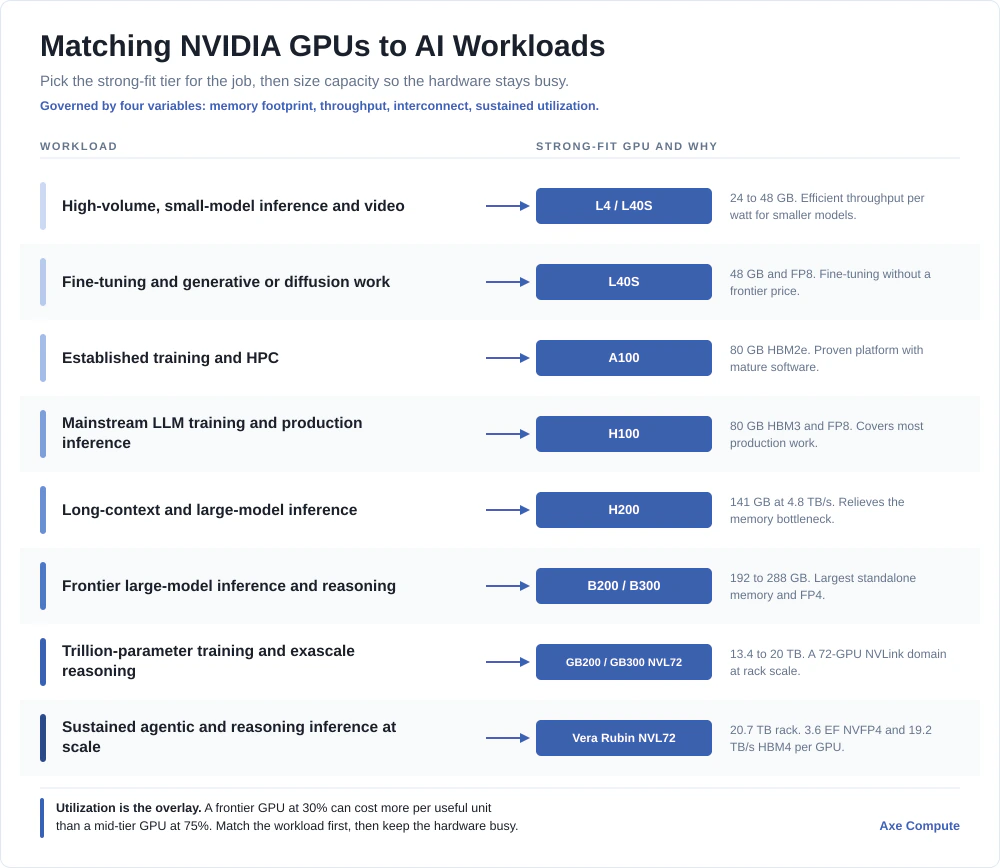
The framework and the range come together in one table. Read it as a starting point, then refine with the four variables above for your specific models.
Table 1: NVIDIA GPUs for AI, mapped to the workloads they fit
| Workload | Strong fit | Why |
|---|---|---|
| High-volume, small-model inference and video | L4 / L40S | Efficient throughput per watt; memory is sufficient for smaller models |
| Fine-tuning and generative or diffusion work | L40S | 48 GB and FP8 speed up fine-tuning without a frontier price |
| Established training and HPC | A100 | Proven platform, strong bandwidth, mature software |
| Mainstream LLM training and production inference | H100 | FP8 throughput and 80 GB cover most production work |
| Long-context and large-model inference | H200 | 141 GB and 4.8 TB/s relieve the memory bottleneck |
| Frontier large-model inference and reasoning | B200 / B300 | Largest standalone memory and FP4 throughput |
| Trillion-parameter training and exascale reasoning | GB200 / GB300 NVL72 | 72-GPU NVLink domain for rack-scale workloads |
| Sustained agentic and reasoning inference at scale | Vera Rubin NVL72 | 3.6 EF NVFP4 (sparse) and 19.2 TB/s HBM4 per GPU serve inference loops at rack scale |
The Overlay That Changes the Answer: Utilization
Specifications choose the candidate. However, utilization decides whether the choice pays off. For instance, a frontier GPU running at 30% can cost more per unit of useful output than a mid-tier GPU running at 75%. So the selection question has two parts: which GPU fits the workload, and how consistently will it run.
This is why right-sizing matters as much as picking the most capable card. A team should choose the GPU that matches the workload, then size capacity so the hardware stays busy. That trade-off includes the point where dedicated infrastructure overtakes elastic cloud. The details are set out in Enterprise GPU Strategy in 2026 and AI Inference Costs at Scale.
Overall, one pattern holds across the entire range. The best outcomes come from matching the GPU to the workload and then keeping it busy, rather than from buying the most powerful hardware available and hoping the workload grows into it.
About Axe Compute
Axe Compute Inc. (NASDAQ: AGPU) is a neocloud AI infrastructure platform built on a fundamental premise: AI innovation should not be constrained by hardware choice or availability. The company provides enterprises and AI innovators with flexibility across hardware, geography, and deployment models through two core offerings: Axe Compute Access, delivering a wide range of the latest high-performance GPU infrastructure across global locations, and Axe Compute Build, enabling the design, deployment, ownership, and operation of large-scale, dedicated AI infrastructure worldwide. All solutions are supported by enterprise-grade SLAs and operational expertise. Axe Compute is headquartered in Pittsburgh, Pennsylvania. For more information, visit axecompute.com.
Book the right GPU for your workload.
Frequently Asked Questions
Which NVIDIA GPU is best for AI inference?
It depends on model size. For high-volume, smaller-model inference and video, the L40S (48 GB) is efficient and cost-effective. Mainstream production inference runs on the H100 (80 GB HBM3) as the standard. For long-context or large-model inference where memory is the limit, the H200 (141 GB HBM3e, 4.8 TB/s) delivers up to around 45% more inference performance than the H100. At frontier scale, the B200, B300, and the rack-scale NVL72 systems take over, with Vera Rubin NVL72 now available as the new top tier.
Which NVIDIA GPU is best for training large language models?
For mainstream LLM training, the H100 is the current standard, with FP8 support and 3.35 TB/s of memory bandwidth. The A100 remains capable for established training and HPC workloads. For frontier, trillion-parameter training, the rack-scale GB200 and GB300 NVL72 systems connect 72 GPUs into a single NVLink domain. The right choice depends on model size, interconnect needs, and how consistently the cluster will run.
What is the difference between the H100 and H200?
The H100 and H200 share the same Hopper compute engine and FP8 throughput. Their one real difference is memory. The H200 carries 141 GB of HBM3e at 4.8 TB/s, against 80 GB of HBM3 at 3.35 TB/s on the H100. That extra capacity and bandwidth make the H200 the better choice for long-context and large-model inference, where it can deliver up to around 45% more performance.
When should I choose Vera Rubin over Blackwell?
Choose Vera Rubin for sustained, large-scale inference where memory bandwidth is the limit. Per NVIDIA’s September 2026 specification update, Vera Rubin NVL72 lists 3.6 exaFLOPS of NVFP4 inference (sparse) per rack against 1.44 exaFLOPS on the GB300 NVL72, with 19.2 TB/s of HBM4 per GPU, and NVIDIA reports one-tenth the cost per million tokens compared with GB200 NVL72. B200, B300, and GB300 capacity is widely available now and remains the right choice for work that needs GPUs today. New dedicated Vera Rubin NVL72 clusters are available through Axe Compute Build.
Which NVIDIA GPUs are available through Axe Compute?
Axe Compute provisions bare-metal NVIDIA capacity across the range in this guide, subject to availability, from L40S and H100 class hardware through H200 and the Blackwell family. Through Axe Compute Build, new dedicated clusters are available on NVIDIA B300, GB300 NVL72, and Vera Rubin NVL72, as well as AMD Helios. The client defines the region, the platform, and RoCE or InfiniBand interconnect, and Axe Compute sources and configures against that specification.
How do I choose the right GPU for my AI workload?
Weigh four variables: memory footprint (does the model and its KV cache fit), throughput (the compute and precision the workload needs), interconnect (whether the job spans many GPUs), and sustained utilization (how consistently the hardware will run). Match those to the workload, then size capacity to keep utilization high. Axe Compute can help map a specific workload mix to the right configuration.
Sources
- NVIDIA H200: 141 GB HBM3e at 4.8 TB/s; up to ~45% faster LLM inference than H100
- NVIDIA H100: 80 GB HBM3 at 3.35 TB/s, Hopper, FP8 (3,958 TFLOPS FP8)
- NVIDIA L40S: 48 GB GDDR6 at 864 GB/s, Ada Lovelace, FP8 Transformer Engine, 350 W
- NVIDIA A100: 80 GB HBM2e at ~2.0 TB/s, Ampere, NVLink (FP16/BF16/INT8)
- NVIDIA GB300 NVL72: 72-GPU NVLink domain, 20 TB HBM3e, 1,440 PFLOPS FP4 sparse (GB200 NVL72: 13.4 TB)
- NVIDIA Vera Rubin NVL72 product page, per the September 2026 update: 72 Rubin GPUs and 36 Vera CPUs; 288 GB HBM4 at 19.2 TB/s per GPU; 20.7 TB HBM4 per rack; NVLink 6 at 216 TB/s per rack; 3,600 PFLOPS NVFP4 inference (sparse); one-tenth the cost per million tokens versus GB200 NVL72; available now
- NVIDIA press release, January 5, 2026: Vera Rubin platform launch at CES
- NVIDIA Technical Blog, “Inside the NVIDIA Vera Rubin Platform”: 50 petaFLOPS NVFP4 per Rubin GPU
- Gholami et al., “AI and Memory Wall,” IEEE Micro: data movement, not arithmetic, is the binding constraint on modern accelerators